

Opinion
Issue: June / July 2026
Issue: June / July 2026
From “How Do You Spell Breakfast?” to the Microsoft MVP Summit
By Traci Williams - May 25, 2026
Traci Williams shares what it’s like to attend the MVP Summit, and gives her top tips for attending a multi-day conference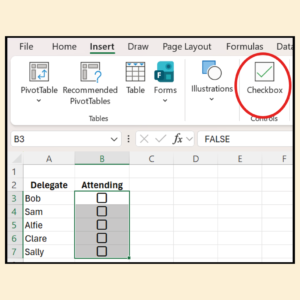
Technology
Issue: April / May 2026
Issue: April / May 2026
Excel Spreadsheets: Checkboxes
By Traci Williams - March 25, 2026
Excel checkboxes were cosmetic and now they’re functional, changing spreadsheets into something users can interact with, explains Traci Williams
Technology
Issue: December 2025 / January 2026
Issue: December 2025 / January 2026
Excel Spreadsheets: Dynamic Arrays
By Traci Williams - December 29, 2025
Traci Williams explains how one formula can do the work of dozens – and make you look like an Excel ACE
Technology
Issue: October / November 2025
Issue: October / November 2025
Excel Spreadsheets: Quick Tips
By Traci Williams - September 27, 2025
Traci Williams explains the small wins that’ll make a change every day
Technology
Issue: August / September 2025
Issue: August / September 2025
Excel Spreadsheets: Using Artificial Intelligence (AI) with Excel
By Traci Williams - July 25, 2025
Traci Williams, a Microsoft Excel Most Valuable Professional, gives us the rundown on which AI tools work best with Excel
Technology
Issue: April / May 2025
Issue: April / May 2025
Excel Spreadsheets: Sort and Filter Formulas
By Traci Williams - March 25, 2025
Dynamic sorting and filtering can transform how you work with data in Excel, making complex tasks simpler and more efficient, says Traci Williams
Technology
Issue: February / March 2025
Issue: February / March 2025
Excel Spreadsheets: Error Checking
By Traci Williams - January 25, 2025
It is imperative that we check, identify and resolve spreadsheet errors efficiently so that the data can be relied on, explains Traci Williams
Technology
Issue: December 2024 / January 2025
Issue: December 2024 / January 2025
Excel Spreadsheets: Groupby and Pivotby
By Traci Williams - November 25, 2024
Traci Williams introduces us to two brand new and shiny formulas in Excel!
Technology
Issue: October / November 2024
Issue: October / November 2024
Excel Spreadsheets: Stock Management
By Traci Williams - September 25, 2024
Traci Williams explains how to use Excel as the tool of choice for creating an effective stock management system
Technology
Issue: April / May 2024
Issue: April / May 2024
Excel Spreadsheets: Budget Management
By Traci Williams - March 25, 2024
Traci Williams explains how to use Excel’s functions and features to create a budget for your project
Technology
Issue: February / March 2024
Issue: February / March 2024
Excel Spreadsheets: Creating Impactful Excel Charts and Graphs
By Traci Williams - January 25, 2024
Excel can be a powerful ally in creating charts and graphs that not only communicate data but also tell a compelling story, says Traci Williams
Technology
Issue: August / September 2023
Issue: August / September 2023
Excel Spreadsheets: Common Excel Questions
By Traci Williams - July 25, 2023
Traci Williams shares her answers to the most common Excel questions she is asked
Technology
Issue: June / July 2023
Issue: June / July 2023
How to Use an Excel Spreadsheet to Manage Your Tasks
By Traci Williams - May 25, 2023
Upgrade your manual to-do list with Traci Williams’ top tips on using Excel to manage your tasks
Technology
Issue: February / March 2023
Issue: February / March 2023
Excel: Take Your Pivot Tables to the Next Level
By Mike Thomas - January 25, 2023
Mike Thomas explains how to use the data model to work around some of Excel's pivot table limitations
Technology
Issue: February / March 2023
Issue: February / March 2023
Excel Spreadsheets: Mistakes
By Traci Williams - January 25, 2023
Errors in your spreadsheet? Traci Williams shares her recommendations for dealing with mistakes in Excel
Technology
Issue: December 2022 / January 2023
Issue: December 2022 / January 2023
Excel Spreadsheets: Styles
By Traci Williams - November 25, 2022
Using ‘Styles’ is a great way to apply lots of formatting styles consistently to spreadsheets, explains Traci Williams