
This article is part of Summer School 2026
Administrative professionals are uniquely positioned to benefit from the combination of AI and project management, explain Ayanna Castro and Corinne Hoisington
You’ve been managing projects for years. Coordinating timelines, keeping executives on track, and identifying problems before anyone else sees them. Nobody called it project management, but that’s exactly what it was. Now, AI is in the room, and it’s changing how work gets done. The administrative professionals who understand project structure and integrate AI with intention won’t just keep up. They will lead.
Project management provides the clarity: defining scope, aligning stakeholders, managing risk, and delivering outcomes. AI provides the acceleration: drafting communications, organizing data, summarizing meetings, and identifying patterns in seconds. But AI does not replace project thinking. It amplifies it.
Navigating the Project Lifecycle with AI
Every successful project moves through five core phases:
Initiate → Plan → Execute → Monitor → Close
Understanding this lifecycle is the foundation of effective project leadership. AI can support each stage, but only when the structure is clear. Here’s how to put it to work at each phase:
INITIATE: Define the foundation
Before a single task is assigned, AI can help you build a clear project charter. This is your project’s north star, and it’s often the step that gets skipped under pressure.
Prompt
Draft a project charter for a company-wide employee recognition program launching in Q3. Include the project purpose, scope, key stakeholders, and three primary deliverables.
PLAN: Build the roadmap
Planning is where projects gain momentum or quietly unravel. AI can generate your first-pass Work Breakdown Structure, identify task dependencies, and draft stakeholder communication plans.
Prompt
Create a Work Breakdown Structure for a 90-day onboarding redesign project. Include task categories and key milestones, and flag any likely dependencies between workstreams.
EXECUTE: Move with precision
Execution is not just task tracking; it’s alignment. AI can draft cross-functional updates, organize agendas, and flag items at risk of falling through the cracks.
Prompt
I have updates from four team leads on a benefits enrolment rollout. Consolidate into one cohesive project update for the director, highlighting progress, blockers, and next steps.
MONITOR: Stay ahead of risk
This is where AI becomes a proactive partner rather than a reactive tool. Use it to surface early warning signs before they become critical issues.
Prompt
Our annual conference project is on schedule, but team communication has slowed and two vendors haven’t confirmed. What risks should I escalate, and what mitigation steps would you recommend?
CLOSE: Capture and learn
Project close is often rushed or skipped entirely. AI can help you build a lessons-learned summary and a polished final report that demonstrates value to leadership.
Prompt
Based on these project notes, draft a close-out report including what went well, what could be improved, and three recommendations for future initiatives of this type.
Planning with Precision: Beginner to Expert
The difference between those who use AI and the professionals who leverage AI is sophistication.
Here’s what that progression looks like in practice:
Beginner
AI as drafting assistant – you direct, it produces.
📋Sample Prompt
Draft a basic project charter for a company-wide employee recognition event. Include purpose, scope, and three key deliverables.
🎯Outcome
Structured starting point; saves blank-page time
Advanced
AI as thinking partner – you challenge it, it stress-tests your plan.
📋Sample Prompt
Here is my project plan for the annual benefits enrolment rollout. What risks am I not accounting for? What stakeholder concerns might arise in week two?
🎯Outcome
Anticipates gaps before they become problems.
Expert
AI as strategic amplifier – you set the vision; it builds the infrastructure around it.
📋Sample Prompt
I am presenting a business case to the VP for a new onboarding process. Draft a one-page executive summary, a risk/benefit matrix, and three objections I should prepare to address.
🎯Outcome
Elevates visibility; positions you as a strategic contributor.
Beginners direct AI to produce. Advanced users challenge AI to think. Experts use AI to build infrastructure around a strategic vision. The tool is the same; it’s the thinking behind the prompt that changes.
From Support Role to Strategic Asset: Leading with Influence
AI doesn’t just save time. It frees cognitive bandwidth, and what you do with that bandwidth determines your professional trajectory.
Administrative professionals often lead without formal authority. Progress happens through coordination, preparation, and proactive communication. The challenge has always been capacity: too many operational demands leave little room for strategic thinking.
AI changes that equation. When AI handles the first draft of the status report, the risk log, the meeting summary, and the vendor follow-up, you get your thinking time back. That time invested in relationship-building, stakeholder alignment, and anticipating leadership needs is what shifts your perceived value in the room.
Consider what this looks like in practice:
- You’re shaping the agenda.
- You’re flagging risks before they become visible to leadership.
- You’re not waiting for direction – you’re walking in with options.
That is influence. And it doesn’t require a new title to exercise it.
Professionals who consistently bring clarity, foresight, and organized execution become trusted advisors not because they asked for the seat at the table, but because they kept demonstrating they already belonged there. AI is what makes that consistency sustainable.
One important note: influence is still human. AI can draft the update, but it cannot read the room. It can surface data patterns, but it cannot navigate interpersonal dynamics or assess what a stakeholder really needs to hear. Leadership maturity is yours. AI enhances your preparation and sharpens your execution. It does not replace your judgment.
Five Real-Life Scenarios and Solutions
The following scenarios reflect situations that administrative professionals actually encounter. Each includes a real prompt, a grounded solution, and a critical reminder of where AI ends and your judgment begins.
Scenario 1: The Last-Minute Event Pivot
Challenge
You’re three days from an executive leadership retreat when the venue falls through. The agenda, vendor confirmations, and stakeholder communications all need to be rebuilt – fast.
AI Solution
Prompt: We had a corporate leadership retreat for 45 people planned for [date]. The venue was cancelled. Draft a revised event timeline with vendor outreach steps, a holding message for attendees, and a risk log for any deliverables in jeopardy.
Refine for tone, confirm accuracy, and distribute – saving hours.
⚠️What Not to Do
Don’t send AI-generated stakeholder communications without reviewing them first. One wrong detail, such as a name, date, or tone, and trust erodes instantly. AI drafts. You decide.
Scenario 2: Conflicting Stakeholder Expectations
Challenge
HR wants onboarding streamlined. Operations wants more documentation. Both departments report to the same VP and expect you to make it work.
AI Solution
Prompt: Two departments have competing priorities for the same onboarding project. HR wants fewer steps; Operations wants more documentation. Outline the trade-offs for each approach and suggest a hybrid model I can present for alignment.” Use the output to facilitate the conversation, not avoid it.
Use the output to facilitate the conversation, not avoid it.
⚠️What Not to Do
Don’t use AI output as your position in the room. Walking into a stakeholder meeting and reading from an AI summary signals you haven’t thought. Use AI as preparation, not as your voice.
Scenario 3: The Overwhelmed Task List
Challenge
You’re supporting three executives across two active projects. Your task list has 47 items and zero prioritization. Everything feels urgent.
AI Solution
Prompt: Here is my full task list. Categorize each item by: urgency (this week vs. this month), dependency (blocked vs. ready to action), and impact (executive-facing vs. internal). Suggest a sequencing order.
Validate before acting. AI doesn’t know your office politics.
⚠️What Not to Do
Don’t delegate your judgment entirely. AI may flag a low-urgency task that your executive actually considers critical. Always cross-reference with your stakeholder priorities before reshuffling your workflow.
Scenario 4: The Executive Update on Short Notice
Challenge
Your director is presenting a project status to the C-suite in 90 minutes. They ask you to prepare a concise summary… right now.
AI Solution
Prompt: Here are bullet points from our last three project updates: [paste bullets]. Draft a one-page executive summary in professional business language, with a RAG status recommendation (Red/Amber/Green) and three key talking points.
Deliver a polished draft in minutes, not hours.
⚠️What Not to Do
Don’t pad the summary with context the executive already knows. AI tends to over-explain when under-prompted. Specify your audience level and expected length, or you’ll get a report when you need a briefing.
Scenario 5: The Project That Feels Off-Track
Challenge
Everything looks fine on paper, but something feels wrong. Team energy is low, communication has slowed, and you can’t articulate why.
AI Solution
Prompt: Our project is meeting milestones, but team communication has slowed, and morale feels low. What early warning signs of project derailment should I look for, and what proactive questions should I ask my team leads?” Use the output to structure a check-in conversation..
⚠️What Not to Do
Don’t let AI diagnose interpersonal dynamics. If someone on your team is disengaged or a stakeholder relationship has shifted, no prompt will surface that. AI can give you the framework. Only you can read the room.
The High-Impact Combination
Project management is a discipline. AI is the acceleration. One provides structure. The other provides speed. Administrative professionals who understand lifecycle thinking, planning rigor, stakeholder alignment, and risk awareness, and then integrate AI strategically, increase both efficiency and influence.
The future of work is human enhanced by AI. Those who master both process and intelligent tools will not just level up their skills. They will elevate their role.
Visualizing Project Leadership with AI
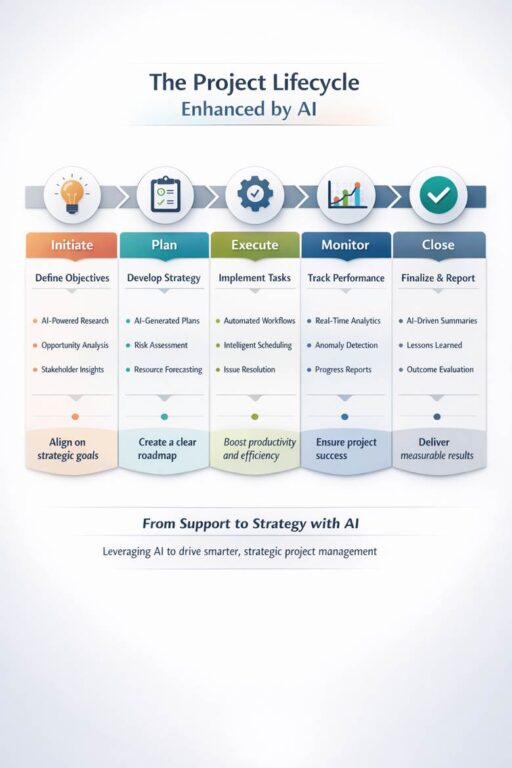
One more powerful way to cement your project leadership – and make it visible to executives – is through clear, high-impact visuals. Infographics translate complexity into clarity, and when grounded in project management thinking, they tell a strategic story rather than just displaying data. Using Copilot Create, administrative professionals can quickly transform project knowledge into executive-friendly visuals that show ownership of scope, flow, and outcomes. The key is to approach the infographic as a mini-project: define the message, structure the lifecycle, and design for decision-makers. Done well, a single visual can communicate foresight, organization, and impact faster than any written update.
Copilot Create Prompt for an Infographic:
Create a clean, executive-level infographic that visualizes the Project Lifecycle (Initiate, Plan, Execute, Monitor, Close) mapped to how AI supports each phase.
For each phase, include:
- The primary project management objective
- 2–3 examples of AI-supported activities (e.g., drafting, risk identification, summarization)
- A short outcome statement showing business value
Design style:
- Professional, modern, and minimal
- Neutral color palette with subtle accents
- Icons for each lifecycle phase
- Readable at a glance for senior leaders
Audience: Executive leadership
Purpose: Show how project management combined with AI elevates administrative professionals from support to strategic contributors.
This kind of visualization doesn’t just explain your work; it positions you. It signals systems thinking, executive awareness, and your ability to translate process into outcomes. And that is exactly what leadership notices.
Our Finished Infographic:
The goal is not to work faster. It’s to think better – and let AI handle the rest.
Want to learn more? Ayanna and Corinne are leading a live virtual workshop on 8th and 15th October: Level Up Your Impact: Project Management and AI for Administrative Professionals.
Executive Support Magazine subscribers receive a discount on the listed price.
For more information and to book, click here:- https://executivesupportmedia.com/product/project-management-and-ai/