Please log in to continue
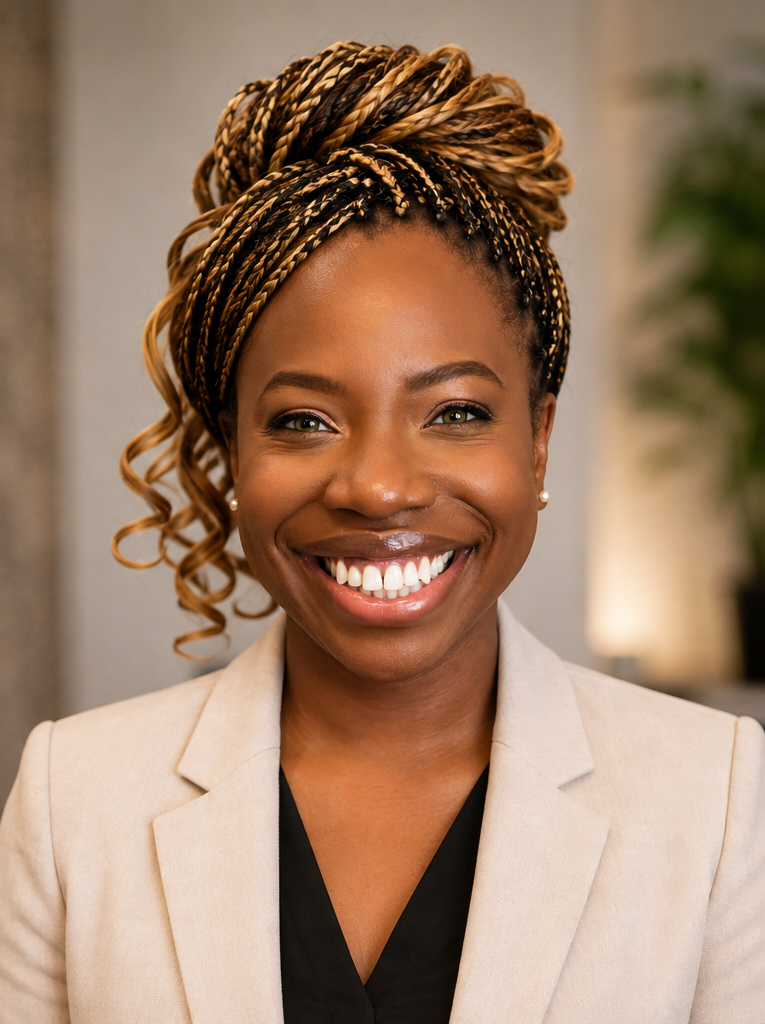
Founder & CEO, ANWOW | 2x Microsoft MVP - M365 Copilot & Microsoft 365 | Executive Assistant | Microsoft 365 & AI Productivity Coach | Corporate Trainer & International Speaker
Lizebeth Georges, formerly known professionally as Lizebeth Koloko-Green, is a 2x Microsoft Most Valuable Professional (MVP) in M365 Copilot and Microsoft 365, Founder and CEO of ANWOW (Adopt New Ways of Working), Executive Assistant, Microsoft 365 & AI Productivity Coach, corporate trainer, and international speaker.
With more than 25 years of experience in international corporate environments, Lizebeth has built a career at the intersection of executive support, technology, productivity, Artificial Intelligence, and workplace transformation.
Through ANWOW, Lizebeth helps individuals and organizations adopt smarter, more effective ways of working with Microsoft 365, Microsoft Copilot, Artificial Intelligence, and leading generative AI platforms such as ChatGPT, Claude, and Gemini. Her approach is highly practical and focused on helping professionals move beyond simply understanding technology to confidently applying it in their everyday work.
Lizebeth holds a Masterâs Degree in Management from ESSEC Business School and a Degree in Office Management from the AcadĂ©mie de Versailles. Bilingual in French and English, she brings an international and multicultural perspective to everything she does.
Born in Paris, France, and raised in Fremont, California, Lizebeth combines her French and American influences with a lifelong passion for technology, education, and helping people grow. At the heart of her work is a simple belief: technology creates its greatest value when it empowers people to work smarter, collaborate better, and achieve more.
This session will cover essential tips and tricks for creating, collaborating, analyzing, automating, and executing tasks designed to help you work smarter and grow wiser.
Participants will learn how to:
Learning Outcomes
Opportunities to work remotely are increasing and are now the new normal for many.
Remote teams depend on different collaborative tools to effectively function as a team and improve their remote operations.
One of the most popular remote work collaboration software is Microsoft Teams. It’s the hub for teamwork, and it combines built-in access to the features of other Office 365 tools such as :
You can access all of this directly in the Microsoft Teams app.
Join Lizebeth Koloko-Green as she shares power-users Microsoft Teams productivity tips and tricks and useful new functionalities you could unlock, which will help you maximize the use of this software. You will walk away with four or five gems that will rock your world.
Learning Outcomes
Learning and implementing these guidelines will allow you to:
This session will introduce you to ChatGPT, an AI language model developed by OpenAI that is set to become an indispensable tool in your administrative arsenal.
Administrative Professionals are the cornerstone of every organization, skillfully managing diverse tasks and projects. By harnessing the power of ChatGPT, you can unlock extraordinary levels of productivity and efficiency, catapulting your administrative capabilities to new heights.
In this immersive and enlightening session, Lizebeth will guide you through how ChatGPT can be integrated into your daily tasks. With practical tips and real-world examples, you will learn how to use ChatGPT to enhance productivity, streamline communications, and boost efficiency across all administrative responsibilities.
This is your opportunity to learn from an industry leader and pioneer new ways of working that will enhance your career and position you at the cutting edge of the administrative profession.
Learning Outcomes
By attending this session, you will:
Experience the game-changing impact of this advanced technology on your productivity and overall work experience. Don’t miss this opportunity to stay ahead in the rapidly evolving world of administrative work.
This session is also available on demand, in our Learning Library
Microsoft OneNote is one of the least known but most useful programs in the Microsoft Office suite. Not familiar with this new tool? Think of Microsoft OneNote as a digital version of a physical notebook.
This means you can capture digital notes and keep them organized. It also means you can add images, diagrams, audio, video, and more.
This session will help you get started quickly, even if you are a complete beginner. We will also look at some more intermediate and advanced tips to make sure you get the most from this valuable program.
Learning Outcomes
Microsoft Loop is a new office app designed for the hybrid workplace. It is a powerful, flexible canvas with portable components that move freely, allowing you to capture ideas, plan your projects, create content, and collaborate with others in real-time from anywhere, from any device, while staying in sync across Microsoft apps ecosystem.
Using Microsoft loop is going to transform the way you work. Once you try it, you will wonder how you ever worked without it.
Do not miss the chance to discover practical tips to enhance team collaboration in a hybrid environment, expand your creative tools and bring the power of AI to you.
Learning Outcomes
In this session, Lizebeth Koloko-Green will share best practices on using Microsoft Loop:
In this session, you will discover:
There are many ways to create, access, organize and share information using the digital tools of Microsoft 365.
In this session, you will learn handy tips and tricks on how to set up file storage, manage your data, share files and documents using:
Microsoft Teams is the hub for teamwork, for real-time collaboration, communication, meetings, file and app sharing in Microsoft 365 and is used by more than 150 million people worldwide every day!
Microsoft OneNote is one of the least known but most useful programs in the Microsoft Office suite. It is a digital version of a physical notebook where you can capture notes and keep them organized. You can also add images, diagrams, audio, video, and more. All your data is saved automatically, and your notes are synched as you work.
When you partner these two powerful platforms and maximize their features, you can help distinguish yourself as a power user with the uncanny ability to create a collaborative workspace and get things done for yourself, your team, and your company.
Learning Outcomes
In this session, you will learn:
Productivity and efficiency are essential factors in the modern workplace. Â Microsoft 365 has set the standard for office productivity software and offers a robust collection of innovative tools that allow people to do they work faster, smarter, quicker, and efficiently.
Learning the powerful features of the Office Suite and developing an awareness of the shortcuts available to you (software features) can make a difference in the way you work and can result in substantial efficiency gains that will boost your career.
In this one hour session, you will learn:
In this one hour session, you will learn how to automate your workflow and business processes by integrating several automation tools such as Power automate, Flow, PowerApps and others.
With the tools that you are currently using, you can streamline repetitive tasks, make processes paperless, and discover that you can save time and increase your productivity.
Learning Objectives:
The struggle is real: your Outlook inbox is a disaster. This is a common theme for mailboxes everywhere, and it is impacting your productivity both professionally and personally.
With a few simple steps, you can start organizing your mess and skyrocketing your productivity. Learning a few simple tricks can save you time, help you work more effectively, and collaborate better with your managers, colleagues, and customers.
Walk away with an action plan you can implement immediately.
Discover new ways of organizing meetings in a digital world
This one-day in-house masterclass is run in conjunction with Diana Brandl.
Are you ready to become a future assistant?
Then join this one-day in-house masterclass with hands-on technology and digitization experts Diana Brandl andLizebeth Koloko-Green where you will not only explore the opportunities around the digital age but also enjoy live trainings on the latest productivity tools. Letâs dive into the world of industry 4.0 and shape it together.
In this course, you will receive insights about:
Half-day session (Diana Brandl)
Half-day session (Lizebeth Koloko-Green):
At the end of this training day, you will be able to:
Lizebeth, it was nice to meet you at yesterdayâs Birmingham PA Conference and I just wanted to send you a message to say how much I enjoyed your presentation. I found the whole session really useful and picked up a lot of time-saving tips (having just switched to Outlook 365!).
An excellent delivery, really practical useful tips that I know will save me time at work. A big thank you to Lizebeth for her time and expertise.
Thank you so much for joining in Nice and being part of our summit. Thank you for running the test game and making everyone more encouraged. It was a great pleasure to meet you. Our event was a success and I am happy you were part of it. I hope you had an amazing time because we truly did have a great time. The feedback from this conference was very positive.Â
The information flows thick and fast here at the Global EA summit. The fabulous Lizebeth Koloko Green talks us through the timesaving tips when using Outlook and OneNote
Merci pour cette prĂ©sentation qui me motive encore plus a dĂ©velopper l’utilisation de l’outil OneNote
Thank you for this presentation it motivated me to better understand the uses of and use OneNote